コンテンツへスキップ
AutoCAD Plant3Dを極めるためのサイト
AutoCAD Plant3D 実践トレーニング講座! ~プラント配管設計DXの道~
  • ホーム
  • Plant3D
  • Plant3D(初級者)
  • Plant3D(実践)
  • DX
  • 配管設計
  • Navisworks
  • Inventor
  • P&ID
  • お問い合わせ

分岐

Plant3D(実践)

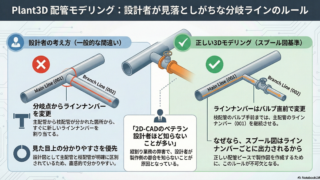
【第36回】Plant3Dでの配管分岐場所について

今回はAutoCAD Plant3D(以下Plant3D)において、配管分岐場所があった場合にどのようにラインナンバーを分けるか?というお話をしたいと思います。まずは下図のP&IDをご覧ください。(function(b,c,f,g,a,d,...
2025.08.18
Plant3D(実践)
最近の投稿

  • 【第108回】機器自動生成④ Plant3D APIで機器を作る!
  • 【第107回】Plant3Dで機器自動生成③ AIの読取結果を設計データへ!
  • 【第106回】Plant3Dで機器自動生成② AIは機器図をどこまで読める?
  • 【第105回】機器自動生成① AIで機器図からPlant3Dへ!
  • 【第104回】「検証」スプール図の部品欄をAIに読み込ませたら?AIの進化が凄い件

アーカイブ

  • 2026年9月
  • 2026年8月
  • 2026年7月
  • 2026年6月
  • 2026年5月
  • 2026年4月
  • 2026年3月
  • 2026年2月
  • 2026年1月
  • 2025年12月
  • 2025年11月
  • 2025年10月
  • 2025年9月
  • 2025年8月
  • 2025年7月
  • 2025年6月

カテゴリー

  • DX
  • Inventor
  • Navisworks
  • P&ID
  • Plant3D
  • Plant3D(初級者)
  • Plant3D(実践)
  • 配管設計
AutoCAD Plant3D 実践トレーニング講座! ~プラント配管設計DXの道~
  • プライバシーポリシー/免責事項
© 2025 AutoCAD Plant3D 実践トレーニング講座! ~プラント配管設計DXの道~.
    • ホーム
    • Plant3D
    • Plant3D(初級者)
    • Plant3D(実践)
    • DX
    • 配管設計
    • Navisworks
    • Inventor
    • P&ID
    • お問い合わせ
  • ホーム
  • トップ